Transform your customer interactions from manual chaos to seamless automation, and watch your business grow.
Many 3D printing businesses face a significant hurdle: inefficient customer onboarding. The traditional process often involves extensive back-and-forth communication, manual file reviews, and individualized price quotes. This not only consumes valuable time but also creates a frustrating experience for new customers, potentially leading to lost opportunities. Imagine spending hours clarifying design specifications, only to have the customer choose a competitor with a faster, more streamlined process.
This manual approach is simply unsustainable for businesses looking to scale. As order volume increases, the onboarding bottleneck becomes even more pronounced, impacting response times, production schedules, and overall customer satisfaction. The key to unlocking growth lies in automating these repetitive tasks and creating a self-service onboarding experience that empowers customers and frees up your team to focus on more complex projects and business development.
SeekMake understands these challenges and provides the tools necessary to build an automated onboarding system. By leveraging our platform, you can transform your customer interactions and unlock the full potential of your 3D printing business.
Before implementing any automation, it’s crucial to map out your ideal customer onboarding workflow. Start by identifying all the steps involved, from initial contact to order confirmation. Consider the common questions customers ask, the file formats you accept, the design rules you enforce, and the information you need to provide an accurate quote. Documenting this process will reveal opportunities for automation and standardization.
Think about incorporating a knowledge base or FAQ section on your website to address common inquiries upfront. Create templates for email responses, price quotes, and order confirmations. Standardize your file submission guidelines and provide clear instructions on design best practices. By creating a well-defined workflow, you lay the foundation for a seamless and automated onboarding experience.
Consider using a flowchart or diagram to visually represent your onboarding process. This will help you identify potential bottlenecks and areas for improvement. Remember, the goal is to create a system that is both efficient for your business and user-friendly for your customers.


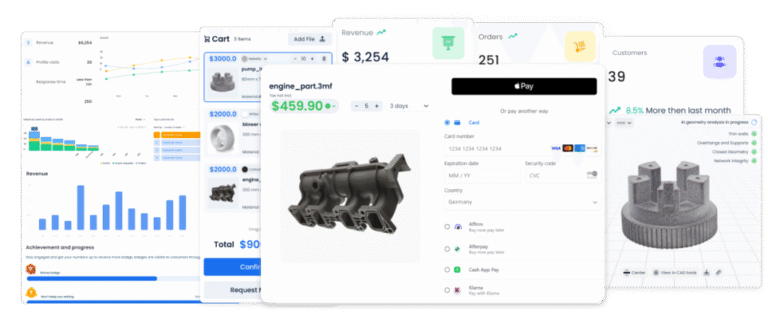
The heart of an automated onboarding system for 3D printing is an instant quoting engine. SeekMake allows you to embed a customizable price calculator directly on your website. Customers can upload their 3D models, select their desired materials and quantities, and receive an immediate price quote. This eliminates the need for manual price calculations and significantly reduces response times.
SeekMake’s platform allows you to define complex pricing rules based on factors such as material costs, print time, machine usage, and post-processing requirements. You can also offer discounts for bulk orders or loyalty programs. The system automatically adjusts prices based on these parameters, ensuring accuracy and consistency.
By providing instant quotes, you empower customers to make informed decisions and move forward with their orders quickly. This not only improves the customer experience but also frees up your sales team to focus on more complex projects and high-value clients. SeekMake’s instant quoting system is a game-changer for 3D printing businesses looking to scale.
Automated email sequences are essential for guiding new customers through the onboarding process. Set up triggered emails that are sent based on specific actions, such as submitting a quote request, uploading a file, or placing an order. These emails can provide helpful information, answer frequently asked questions, and guide customers to the next step.
For example, you can send a welcome email immediately after a customer submits a quote request. This email can thank them for their interest, provide links to helpful resources, and explain the next steps in the process. You can also send a follow-up email if the customer doesn’t complete their order within a certain timeframe.
Personalize your emails by using the customer’s name and referencing their specific project. This will make them feel valued and increase the likelihood that they will complete their order. By automating your communication, you can provide a consistent and informative experience for every customer, without requiring manual intervention.
To truly streamline your onboarding process, integrate your quoting system and automated emails with your CRM (Customer Relationship Management) and production management system. This will allow you to track customer interactions, manage orders, and monitor production progress in a centralized location.
When a customer places an order, the information should automatically be transferred to your CRM, creating a new customer record. The order details should also be sent to your production management system, triggering the necessary workflows for printing and fulfillment. This eliminates the need for manual data entry and reduces the risk of errors.
By integrating your systems, you can gain valuable insights into your customer onboarding process. You can track conversion rates, identify bottlenecks, and optimize your workflow for maximum efficiency. This data-driven approach will help you continuously improve your customer experience and drive business growth.
Automation isn’t a set-it-and-forget-it solution. It’s crucial to continuously monitor the performance of your automated onboarding system, analyze the data, and make adjustments as needed. Track key metrics such as conversion rates, customer satisfaction scores, and order processing times.
Use analytics tools to identify areas where customers are dropping off or experiencing difficulties. Collect feedback from customers to understand their pain points and identify opportunities for improvement. Regularly review your email templates and pricing rules to ensure they are up-to-date and effective.
By continuously monitoring and optimizing your automated onboarding system, you can ensure that it remains a valuable asset for your business. This iterative approach will help you stay ahead of the competition and provide a world-class customer experience.
Key Takeaways